RichTextX
RichTextX是一个EditText拓展库,考虑基于EditText实现富文本的编辑和显示,因此开发了它,目前开源在Github。
开源地址:https://github.com/shine56/RichTextX
添加依赖
1
| implementation 'com.shine56.richtextx:richtextx:1.0.4-beta'
|
文本编辑器使用方法
在布局文件中
像添加 EditText 一样在布局文件中文件中添加RichEditText
1
2
3
4
5
6
| <com.shine56.richtextx.view.RichEditText
android:id="@+id/rich_edit_text"
android:textSize="16sp"
android:lineHeight="20dp"
android:layout_width="match_parent"
android:layout_height="wrap_content" />
|
在kotlin文件中:
插入图片
1
2
3
4
5
6
7
| val richEditText = findViewById<RichEditText>(R.id.rich_edit_text)
val image = richEditText.imageBuilder
.setImageUrl("imageUrl")
.setDrawableGet {
}.create()
writeEdit.insertPhoto(image)
|
为图片设置点击事件和删除事件
1
2
3
4
5
6
7
8
9
10
11
12
| val image = writeEdit.imageBuilder
.setImageUrl(it)
.setDrawableGet {
}
.setOnImageCLickListener { view, imgUrl ->
}
.setOnImageDeleteListener { view, imgUrl ->
}
.create()
|
其它富文本操作
1
2
3
4
5
6
7
8
9
10
11
12
13
14
|
richEditText.setBold(true)
richEditText.indent()
richEditText.setFontSize(28)
|
文本显示器使用方法
在布局文件中:
像添加 TextView 一样在布局文件中文件中添加RichTextView
1
2
3
4
| <com.shine56.richtextx.view.RichTextView
android:id="@+id/rich_text_view"
android:layout_width="match_parent"
android:layout_height="wrap_content"/>
|
在kotlin文件中:
显示htnl文本
1
2
3
4
5
6
7
8
9
10
11
|
val htmlText = Html.toHtml(richEditText.text)
val image = writeEdit.imageBuilder
.setImageUrl(it)
.setDrawableGet {
}.create()
val richTextView = findViewById<RichTextView>(R.id.rich_text_view)
richTextView.setTextFromHtml(htmlText, image)
|
补充说明
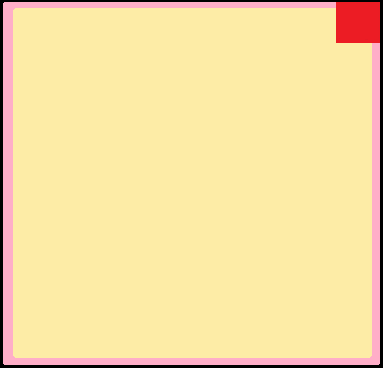
- 插入图片为其设置点击事件和删除事件时,事件响应区域如下图所示,点击黄色区域响应点击事件,点击右上角红色区域响应删除事件。
开源地址:https://github.com/shine56/RichTextX,有兴趣给个star